New

Ultra: Framer to Astro

Export your Framer project to Astro code

Ultra turns your Framer project into an editable Astro project: pages, components and CMS content as code, checked by a real build before you download it.

  • Free pre-check
  • One-time per project
  • Working build or your money back

From Framer to Astro in three steps

Check your project for free, pay once, and download a project that already builds.

Run the free pre-check

Paste your Framer project link and an API key. You see its pages, CMS and price before you pay.

1

Run the free pre-check

Paste your Framer project link and an API key. You see its pages, CMS and price before you pay.

1

Buy once for the project

From $99, priced by designed pages. No subscription, and a failed export never counts.

2

Buy once for the project

From $99, priced by designed pages. No subscription, and a failed export never counts.

2

Download your Astro project

The export starts right after payment. PullPage builds it, then you get a ZIP with a report of known differences.

3

Download your Astro project

The export starts right after payment. PullPage builds it, then you get a ZIP with a report of known differences.

3

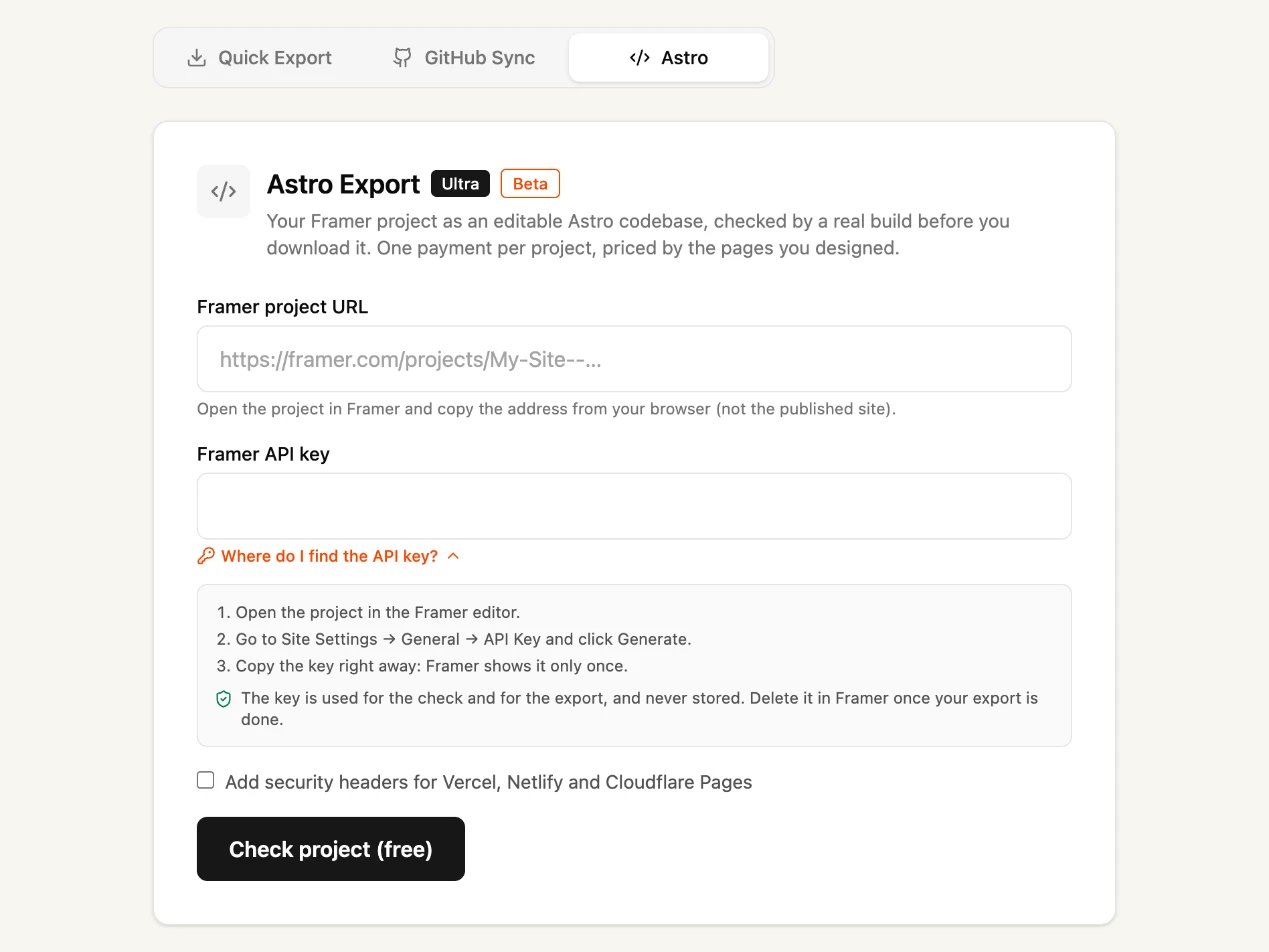
Step 1 in the PullPage dashboard: the Astro export form
The Astro export form with fields for the Framer project URL and API key

What you get

An Astro project you own, built before delivery and backed by a guarantee.

Real Astro code, not a snapshot

Pages, components and CMS content become an Astro project you can open in your editor, change and extend like any other codebase.

Checked by a real build

Before delivery, PullPage installs and builds the project with npm install and npm run build. Only a project that builds is delivered.

Working build or your money back

If the export doesn't build on Node.js 22.12 or later, tell us within 14 days. We fix it or refund the purchase in full.

Your API key stays private

PullPage holds it encrypted in memory for up to 24 hours so your export can start right after payment. It is never saved to disk and is deleted after the export. You can delete it in Framer at any time.

Compare it yourself

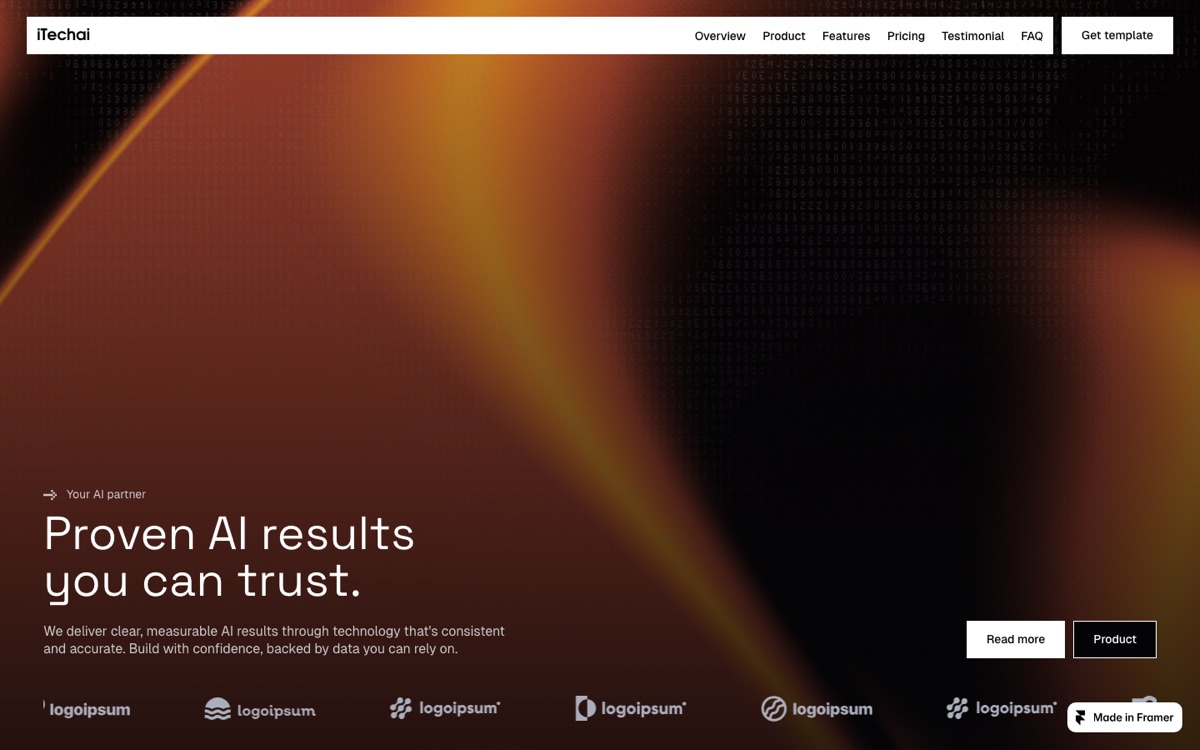
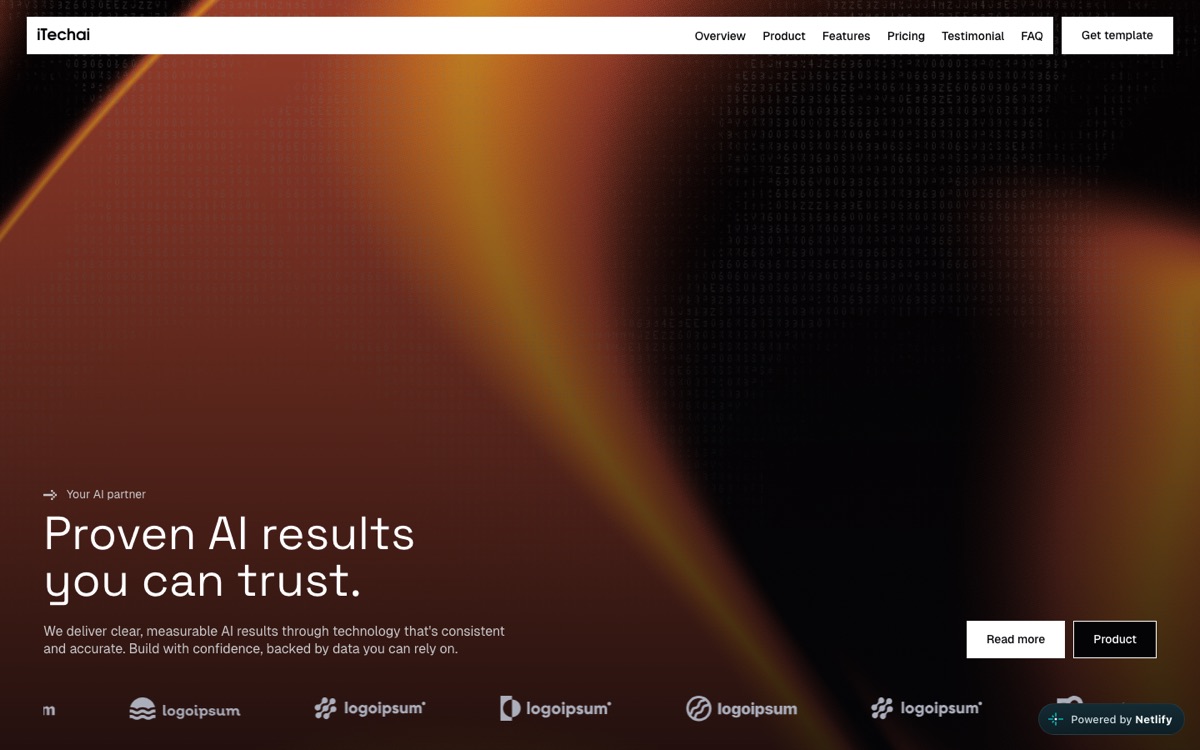
The same Framer template twice: the original on Framer, and its Ultra export, built with Astro and hosted on Netlify.

Original on Framer

inquisitive-habits-644216.framer.app

Open on Framer

Ultra export on Netlify

inquisitive-habits-644216.netlify.app

Open on Netlify

Ultra or a Full export?

A Full export is your site, ready to host as it is. Ultra is your site as code you keep building on.

Plan to compare

Host your Framer site as it is

Full export (Plus)
$5/export

Buy Full exports

Keep building in code

Ultra
from $99/project

Check for free

Full export and Ultra compared
Host your Framer site as it is Keep building in code
Full export (Plus)
$5/export

Buy Full exports

Ultra
from $99/project

Check for free

Exports
You get
Website files
Astro project
Exports
As many as you buy
1 per purchase
Price per export
$5 $4 in a 5-pack
from $99 per project
Unused exports
Never expire
Not included
Pages per export
Up to 100
10, 30 or 75 priced by designed pages
Size per export
500 MB
500 MB
In the download
All supported images, fonts and scripts are downloaded into the ZIP and linked locally, so your site runs from your own host.
Included
Included
No “Made in Framer” badge
Included
Included
Generate sitemap.xml and robots.txt, set canonical links to your domain, and choose which pages search engines may index.
Included
Included
A real Astro project: your pages, components and CMS content as files you can edit, not a copy of the published HTML. Code components become React islands.
Not included
Included
CMS as Markdown files
Not included
Included
Build-tested before delivery
Not included
Included
Report of known differences
Not included
Included
Workflow
Connect a repository once. Each export is committed to a branch and opened as a pull request, which you can merge from your PullPage dashboard.
Not included
Not included ZIP download
When many exports run at once, higher priority starts first. Free: normal · Plus: high · Premium: highest. Ultra exports have their own queue.
High
Own queue never waits behind website exports
Free price pre-check
Not included
Included
Optional, for Ultra: every CMS entry is checked automatically, a person compares each template with your Framer site on desktop, tablet and mobile, and we fix the differences. The scope and price are set in a quote.
Not included
From $390 add-on, on request
Billing & guarantees
How you pay
Once per pack
Once per project
Cancel
Nothing to cancel
Nothing to cancel
Money back
Unused purchases within 14 days, packs only if none used
Build guarantee fix or full refund

Free, Premium and GitHub Sync are in the full comparison.

What's inside your Astro project

The folders of a PullPage Astro export and what each one holds.

src/pages/
One Astro page per Framer page, with its SEO settings.
src/sections/
The sections of each page as Astro markup.
src/layouts/
The page shell with head, navigation and footer around every page.
src/components/
Your Framer components as reusable Astro components.
src/content/
CMS collections as Markdown files.
src/framer/
Your code components as React islands, if the project has any.
src/styles/
Design tokens, typography and page styles as CSS.
public/
Images, fonts and the small scripts for animations.
astro.config.mjs, package.json
Settings and dependencies. Build with npm run build and host the result anywhere.

Who Ultra is for

Ultra fits four situations where the website should live as code you own.

Agencies handing off client sites

Design the site in Framer, then hand the client an Astro project they own. They can edit it, host it with any provider and extend it.

Designers working with developers

Give developers a real codebase instead of a design file. They build on the same pages, components and CMS content you designed.

Teams wanting a Git workflow

Ultra arrives as a ZIP. Put the project in your own repository and review each change in a pull request before it goes live.

Sites leaving Framer hosting

Keep your design and host the Astro project on any provider, so you no longer need a monthly Framer site plan for hosting.

Not sure Ultra is the right way? Read how to migrate a Framer site to Astro: rebuild it, hire an agency, or convert it.

One price per project

Priced by designed pages, paid once.

Ultra

Your Framer project as editable Astro code.

$

99

/project

One-time · up to 10 designed pages

Check my project free

Exact price before you pay

You get

1 Astro project

build-tested before you download it

Code you own

  • Editable Astro source code

  • Pages, components & CMS as files

  • Host anywhere, no lock-in

Zero risk

  • Free pre-check, exact price upfront

  • Working build or your money back

  • Priced by designed pages

Add-on on request

Manual QA · from $390

Every CMS entry checked automatically, each template compared with your Framer site by a person, and the differences fixed. Ask for a quote

Need website exports or GitHub Sync instead? Compare all plans.

This website is an Ultra export

pull.page was designed in Framer and exported to Astro with Ultra. Since then we edit and host it as code.

FAQ

Can't find the answer you are looking for?
Reach out to us here.

How is Ultra different from a Full export?

A Full export, with Plus or Premium, is a static snapshot of your published site: HTML, CSS and JavaScript to host as it is. Ultra rebuilds your Framer project as an Astro project, with pages, components and CMS content as source code you can edit.

How is Ultra different from a Full export?

A Full export, with Plus or Premium, is a static snapshot of your published site: HTML, CSS and JavaScript to host as it is. Ultra rebuilds your Framer project as an Astro project, with pages, components and CMS content as source code you can edit.

How is Ultra different from a Full export?

A Full export, with Plus or Premium, is a static snapshot of your published site: HTML, CSS and JavaScript to host as it is. Ultra rebuilds your Framer project as an Astro project, with pages, components and CMS content as source code you can edit.

How is Ultra different from a Full export?

A Full export, with Plus or Premium, is a static snapshot of your published site: HTML, CSS and JavaScript to host as it is. Ultra rebuilds your Framer project as an Astro project, with pages, components and CMS content as source code you can edit.

How is Ultra different from a Full export?

A Full export, with Plus or Premium, is a static snapshot of your published site: HTML, CSS and JavaScript to host as it is. Ultra rebuilds your Framer project as an Astro project, with pages, components and CMS content as source code you can edit.

How is Ultra different from a Full export?

A Full export, with Plus or Premium, is a static snapshot of your published site: HTML, CSS and JavaScript to host as it is. Ultra rebuilds your Framer project as an Astro project, with pages, components and CMS content as source code you can edit.

How is Ultra different from a Full export?

A Full export, with Plus or Premium, is a static snapshot of your published site: HTML, CSS and JavaScript to host as it is. Ultra rebuilds your Framer project as an Astro project, with pages, components and CMS content as source code you can edit.

How is Ultra different from a Full export?

A Full export, with Plus or Premium, is a static snapshot of your published site: HTML, CSS and JavaScript to host as it is. Ultra rebuilds your Framer project as an Astro project, with pages, components and CMS content as source code you can edit.

How much does Ultra cost?

Ultra is paid once per project and priced by designed pages: up to 10 designed pages $99, up to 30 pages $199, up to 75 pages $399. Each static page and each CMS template counts once; up to 1,000 CMS entries are included. Larger projects get a quote.

How much does Ultra cost?

Ultra is paid once per project and priced by designed pages: up to 10 designed pages $99, up to 30 pages $199, up to 75 pages $399. Each static page and each CMS template counts once; up to 1,000 CMS entries are included. Larger projects get a quote.

How much does Ultra cost?

Ultra is paid once per project and priced by designed pages: up to 10 designed pages $99, up to 30 pages $199, up to 75 pages $399. Each static page and each CMS template counts once; up to 1,000 CMS entries are included. Larger projects get a quote.

How much does Ultra cost?

Ultra is paid once per project and priced by designed pages: up to 10 designed pages $99, up to 30 pages $199, up to 75 pages $399. Each static page and each CMS template counts once; up to 1,000 CMS entries are included. Larger projects get a quote.

How much does Ultra cost?

Ultra is paid once per project and priced by designed pages: up to 10 designed pages $99, up to 30 pages $199, up to 75 pages $399. Each static page and each CMS template counts once; up to 1,000 CMS entries are included. Larger projects get a quote.

How much does Ultra cost?

Ultra is paid once per project and priced by designed pages: up to 10 designed pages $99, up to 30 pages $199, up to 75 pages $399. Each static page and each CMS template counts once; up to 1,000 CMS entries are included. Larger projects get a quote.

How much does Ultra cost?

Ultra is paid once per project and priced by designed pages: up to 10 designed pages $99, up to 30 pages $199, up to 75 pages $399. Each static page and each CMS template counts once; up to 1,000 CMS entries are included. Larger projects get a quote.

How much does Ultra cost?

Ultra is paid once per project and priced by designed pages: up to 10 designed pages $99, up to 30 pages $199, up to 75 pages $399. Each static page and each CMS template counts once; up to 1,000 CMS entries are included. Larger projects get a quote.

Why do you need an API key?

Ultra reads your Framer project itself, not just the published site, through Framer's API. You create the key in Framer and enter it for the pre-check. PullPage holds it encrypted in memory for up to 24 hours so the export can start right after payment, never saves it to disk and deletes it after the export. If it's lost before the export, for example after a server restart, we ask you to paste it again. Delete it in Framer once your export is done.

Why do you need an API key?

Ultra reads your Framer project itself, not just the published site, through Framer's API. You create the key in Framer and enter it for the pre-check. PullPage holds it encrypted in memory for up to 24 hours so the export can start right after payment, never saves it to disk and deletes it after the export. If it's lost before the export, for example after a server restart, we ask you to paste it again. Delete it in Framer once your export is done.

Why do you need an API key?

Ultra reads your Framer project itself, not just the published site, through Framer's API. You create the key in Framer and enter it for the pre-check. PullPage holds it encrypted in memory for up to 24 hours so the export can start right after payment, never saves it to disk and deletes it after the export. If it's lost before the export, for example after a server restart, we ask you to paste it again. Delete it in Framer once your export is done.

Why do you need an API key?

Ultra reads your Framer project itself, not just the published site, through Framer's API. You create the key in Framer and enter it for the pre-check. PullPage holds it encrypted in memory for up to 24 hours so the export can start right after payment, never saves it to disk and deletes it after the export. If it's lost before the export, for example after a server restart, we ask you to paste it again. Delete it in Framer once your export is done.

Why do you need an API key?

Ultra reads your Framer project itself, not just the published site, through Framer's API. You create the key in Framer and enter it for the pre-check. PullPage holds it encrypted in memory for up to 24 hours so the export can start right after payment, never saves it to disk and deletes it after the export. If it's lost before the export, for example after a server restart, we ask you to paste it again. Delete it in Framer once your export is done.

Why do you need an API key?

Ultra reads your Framer project itself, not just the published site, through Framer's API. You create the key in Framer and enter it for the pre-check. PullPage holds it encrypted in memory for up to 24 hours so the export can start right after payment, never saves it to disk and deletes it after the export. If it's lost before the export, for example after a server restart, we ask you to paste it again. Delete it in Framer once your export is done.

Why do you need an API key?

Ultra reads your Framer project itself, not just the published site, through Framer's API. You create the key in Framer and enter it for the pre-check. PullPage holds it encrypted in memory for up to 24 hours so the export can start right after payment, never saves it to disk and deletes it after the export. If it's lost before the export, for example after a server restart, we ask you to paste it again. Delete it in Framer once your export is done.

Why do you need an API key?

Ultra reads your Framer project itself, not just the published site, through Framer's API. You create the key in Framer and enter it for the pre-check. PullPage holds it encrypted in memory for up to 24 hours so the export can start right after payment, never saves it to disk and deletes it after the export. If it's lost before the export, for example after a server restart, we ask you to paste it again. Delete it in Framer once your export is done.

What if the export doesn't build?

Only a project that builds is delivered; an export that fails doesn't count and your purchase stays open. If a delivered project doesn't build with npm install and npm run build on Node.js 22.12 or later, tell us within 14 days and we fix it or refund you in full.

What if the export doesn't build?

Only a project that builds is delivered; an export that fails doesn't count and your purchase stays open. If a delivered project doesn't build with npm install and npm run build on Node.js 22.12 or later, tell us within 14 days and we fix it or refund you in full.

What if the export doesn't build?

Only a project that builds is delivered; an export that fails doesn't count and your purchase stays open. If a delivered project doesn't build with npm install and npm run build on Node.js 22.12 or later, tell us within 14 days and we fix it or refund you in full.

What if the export doesn't build?

Only a project that builds is delivered; an export that fails doesn't count and your purchase stays open. If a delivered project doesn't build with npm install and npm run build on Node.js 22.12 or later, tell us within 14 days and we fix it or refund you in full.

What if the export doesn't build?

Only a project that builds is delivered; an export that fails doesn't count and your purchase stays open. If a delivered project doesn't build with npm install and npm run build on Node.js 22.12 or later, tell us within 14 days and we fix it or refund you in full.

What if the export doesn't build?

Only a project that builds is delivered; an export that fails doesn't count and your purchase stays open. If a delivered project doesn't build with npm install and npm run build on Node.js 22.12 or later, tell us within 14 days and we fix it or refund you in full.

What if the export doesn't build?

Only a project that builds is delivered; an export that fails doesn't count and your purchase stays open. If a delivered project doesn't build with npm install and npm run build on Node.js 22.12 or later, tell us within 14 days and we fix it or refund you in full.

What if the export doesn't build?

Only a project that builds is delivered; an export that fails doesn't count and your purchase stays open. If a delivered project doesn't build with npm install and npm run build on Node.js 22.12 or later, tell us within 14 days and we fix it or refund you in full.

What doesn't carry over?

Features that depend on Framer's servers, such as forms, Framer Analytics, password protection or Framer Checkout, need to be reconnected or rebuilt. Code components, fonts and other assets from third parties keep their own licenses.

What doesn't carry over?

Features that depend on Framer's servers, such as forms, Framer Analytics, password protection or Framer Checkout, need to be reconnected or rebuilt. Code components, fonts and other assets from third parties keep their own licenses.

What doesn't carry over?

Features that depend on Framer's servers, such as forms, Framer Analytics, password protection or Framer Checkout, need to be reconnected or rebuilt. Code components, fonts and other assets from third parties keep their own licenses.

What doesn't carry over?

Features that depend on Framer's servers, such as forms, Framer Analytics, password protection or Framer Checkout, need to be reconnected or rebuilt. Code components, fonts and other assets from third parties keep their own licenses.

What doesn't carry over?

Features that depend on Framer's servers, such as forms, Framer Analytics, password protection or Framer Checkout, need to be reconnected or rebuilt. Code components, fonts and other assets from third parties keep their own licenses.

What doesn't carry over?

Features that depend on Framer's servers, such as forms, Framer Analytics, password protection or Framer Checkout, need to be reconnected or rebuilt. Code components, fonts and other assets from third parties keep their own licenses.

What doesn't carry over?

Features that depend on Framer's servers, such as forms, Framer Analytics, password protection or Framer Checkout, need to be reconnected or rebuilt. Code components, fonts and other assets from third parties keep their own licenses.

What doesn't carry over?

Features that depend on Framer's servers, such as forms, Framer Analytics, password protection or Framer Checkout, need to be reconnected or rebuilt. Code components, fonts and other assets from third parties keep their own licenses.

Can I export the same project again?

One purchase covers one successful export of the project at the tier you bought. A later export of the same project is a new purchase. Ultra is delivered as a ZIP; GitHub Sync comes with Premium, for website exports.

Can I export the same project again?

One purchase covers one successful export of the project at the tier you bought. A later export of the same project is a new purchase. Ultra is delivered as a ZIP; GitHub Sync comes with Premium, for website exports.

Can I export the same project again?

One purchase covers one successful export of the project at the tier you bought. A later export of the same project is a new purchase. Ultra is delivered as a ZIP; GitHub Sync comes with Premium, for website exports.

Can I export the same project again?

One purchase covers one successful export of the project at the tier you bought. A later export of the same project is a new purchase. Ultra is delivered as a ZIP; GitHub Sync comes with Premium, for website exports.

Can I export the same project again?

One purchase covers one successful export of the project at the tier you bought. A later export of the same project is a new purchase. Ultra is delivered as a ZIP; GitHub Sync comes with Premium, for website exports.

Can I export the same project again?

One purchase covers one successful export of the project at the tier you bought. A later export of the same project is a new purchase. Ultra is delivered as a ZIP; GitHub Sync comes with Premium, for website exports.

Can I export the same project again?

One purchase covers one successful export of the project at the tier you bought. A later export of the same project is a new purchase. Ultra is delivered as a ZIP; GitHub Sync comes with Premium, for website exports.

Can I export the same project again?

One purchase covers one successful export of the project at the tier you bought. A later export of the same project is a new purchase. Ultra is delivered as a ZIP; GitHub Sync comes with Premium, for website exports.

Do I own the code?

Yes. The source code Ultra generates for your project is yours to use, change, host and distribute without further fees. Content, code components, fonts and assets from third parties stay under their own licenses.

Do I own the code?

Yes. The source code Ultra generates for your project is yours to use, change, host and distribute without further fees. Content, code components, fonts and assets from third parties stay under their own licenses.

Do I own the code?

Yes. The source code Ultra generates for your project is yours to use, change, host and distribute without further fees. Content, code components, fonts and assets from third parties stay under their own licenses.

Do I own the code?

Yes. The source code Ultra generates for your project is yours to use, change, host and distribute without further fees. Content, code components, fonts and assets from third parties stay under their own licenses.

Do I own the code?

Yes. The source code Ultra generates for your project is yours to use, change, host and distribute without further fees. Content, code components, fonts and assets from third parties stay under their own licenses.

Do I own the code?

Yes. The source code Ultra generates for your project is yours to use, change, host and distribute without further fees. Content, code components, fonts and assets from third parties stay under their own licenses.

Do I own the code?

Yes. The source code Ultra generates for your project is yours to use, change, host and distribute without further fees. Content, code components, fonts and assets from third parties stay under their own licenses.

Do I own the code?

Yes. The source code Ultra generates for your project is yours to use, change, host and distribute without further fees. Content, code components, fonts and assets from third parties stay under their own licenses.

Ready to Export?

Keep using the world’s most powerful visual editor as your workspace. Export your site in seconds and cut your monthly costs, or take it to Astro code with Ultra.

Get started for free

No credit card required.

Ready to Export?

Keep using the world’s most powerful visual editor as your workspace. Export your site in seconds and cut your monthly costs, or take it to Astro code with Ultra.

Get started for free

No credit card required.

Ready to Export?

Keep using the world’s most powerful visual editor as your workspace. Export your site in seconds and cut your monthly costs, or take it to Astro code with Ultra.

Get started for free

No credit card required.